Your First Bot
Origins
My First Robot in classic Robocode was created by Mathew A. Nelson, and Tank Royale's beginner tutorial was developed by Flemming N. Larsen and the Tank Royale project.
New to Robocode or Robocode Tank Royale? This overview gives you the mental model for getting a simple, working bot into the arena. It's platform- and language-neutral. For concrete, step-by-step instructions and code, use the official tutorials below.
Start here: the original tutorials
- Classic Robocode: https://robowiki.net/wiki/Robocode/My_First_Robot
- Robocode Tank Royale: https://robocode.dev/tutorial/my-first-bot.html
Those guides show exact setup steps, APIs, and project/configuration details. This page complements them by explaining the shared lifecycle every bot follows.
The bot lifecycle at a glance
Think of your bot as a real-time agent. Each turn it senses the world, decides what to do, and acts. The exact API calls differ between Classic and Tank Royale, but the rhythm stays the same: sense, plan, act, repeat.
Initialization: one-time setup
Initialization runs once before the main loop. Keep it lightweight and focused on stable settings:
- Visual identity: Set body, gun, radar, and bullet colors so you can spot your bot during a match.
- Defaults and parameters: Choose initial movement speed/turn rates, radar sweep strategy, and default firepower.
- Event hooks (if applicable): Register listeners for events such as enemy scanned, hit by bullet, or collision.
Avoid heavy computation in initialization. If you need data processing, compute lazily or spread it across early turns.
Entering the run loop
After initialization, your bot enters its main run() loop. Conceptually, each turn:
- Scans for enemies
- Updates targeting
- Chooses movement
- Fires if the gun is cool and conditions are right
Events that occur during the turn (e.g., you were scanned or hit) can adjust your next decisions or trigger immediate responses.
Energy and bullets in one sentence
Firing always spends some of your bot's energy to create a bullet. Too many big shots can leave your bot weak or even disabled, so smart bots balance when and how hard they fire.
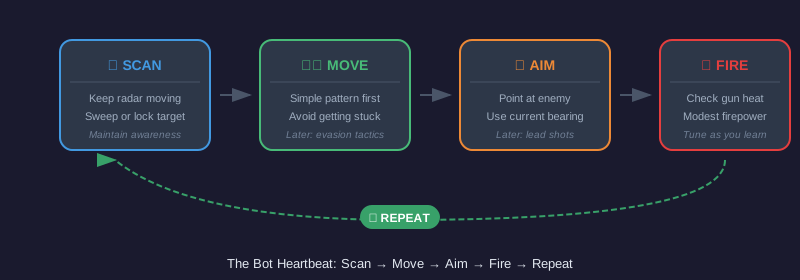
Per-turn actions (the heartbeat)
Each turn follows the same rhythm:
- Scan: Keep the radar moving to maintain awareness. Choose between sweeping and locking.
- Move: Start with simple patterns. Later, add wall avoidance and evasive maneuvers.
- Aim: Point the gun at the detected enemy. Advanced bots predict future positions.
- Fire: Only when the gun is ready. Use modest, consistent firepower at first.
- Repeat: Issue commands, then proceed to the next turn.
Event-driven reactions
Most APIs surface events like:
- Enemy scanned: Often triggers aiming and firing.
- Hit by a bullet: Consider altering movement to be less predictable.
- Collisions (walls or other bots): Correct heading, move back, or adjust speed.
Keep reactions small and focused. They should either trigger an immediate response (e.g., dodge) or update the state for the next turn (e.g., last known enemy position).
A minimal bot in five languages
The following examples implement the same small bot on each platform. The bot moves back and forth, rotates its gun, and fires when it scans an opponent. The gun and radar use their default chained behavior, so rotating the gun also keeps the radar sweeping.
The examples contain source code only. Use the platform tutorials in Further Reading for project files, dependencies, bot configuration, and instructions for starting a battle.
import robocode.Robot;
import robocode.ScannedRobotEvent;

public class MyFirstRobot extends Robot {
    @Override
    public void run() {
        while (true) {
            ahead(100);
            turnGunRight(360);
            back(100);
            turnGunRight(360);
        }
    }

    @Override
    public void onScannedRobot(ScannedRobotEvent event) {
        fire(1);
    }
}from robocode_tank_royale.bot_api import Bot
from robocode_tank_royale.bot_api.events import ScannedBotEvent
class MyFirstBot(Bot):
def run(self) -> None:
while self.running:
self.forward(100)
self.turn_gun_right(360)
self.back(100)
self.turn_gun_right(360)
def on_scanned_bot(self, event: ScannedBotEvent) -> None:
self.fire(1)
def main() -> None:
MyFirstBot().start()
if __name__ == "__main__":
main()import dev.robocode.tankroyale.botapi.Bot;
import dev.robocode.tankroyale.botapi.events.ScannedBotEvent;
public class MyFirstBot extends Bot {
public static void main(String[] args) {
new MyFirstBot().start();
}
@Override
public void run() {
while (isRunning()) {
forward(100);
turnGunRight(360);
back(100);
turnGunRight(360);
}
}
@Override
public void onScannedBot(ScannedBotEvent event) {
fire(1);
}
}using Robocode.TankRoyale.BotApi;
using Robocode.TankRoyale.BotApi.Events;
public class MyFirstBot : Bot
{
static void Main(string[] args)
{
new MyFirstBot().Start();
}
public override void Run()
{
while (IsRunning)
{
Forward(100);
TurnGunRight(360);
Back(100);
TurnGunRight(360);
}
}
public override void OnScannedBot(ScannedBotEvent evt)
{
Fire(1);
}
}import { Bot, ScannedBotEvent } from "@robocode.dev/tank-royale-bot-api";
class MyFirstBot extends Bot {
static main() {
new MyFirstBot().start();
}
override run() {
while (this.isRunning()) {
this.forward(100);
this.turnGunLeft(360);
this.back(100);
this.turnGunLeft(360);
}
}
override onScannedBot(event: ScannedBotEvent) {
this.fire(1);
}
}
MyFirstBot.main();Minimal platform notes
- Classic Robocode typically uses a properties (
.properties) file to define the bot. The filename usually must match your bot's class name. See the classic tutorial for exact fields and placement: Robot properties - Robocode Tank Royale uses a JSON configuration file for bot metadata/settings. See the Tank Royale tutorial for the current schema and placement: https://robocode.dev/tutorial/my-first-bot.html
If you're unsure whether something belongs in config or code, rely on the tutorial for your platform. The formats and best practices can evolve.
How battles differ between platforms
Beyond configuration files, the platforms differ in how battles are run (GUI vs. server architecture). See Classic vs Tank Royale: How Battles Differ for details.
Example: Classic Robocode properties file
MyFirstRobot.properties
robot.description=\
  A sample robot\n\
  Moves in a seesaw motion, and spins the gun around at each end\n\
  Turns perpendicular to the direction of a bullet that hits it
robot.webpage=http\://robocode.sourceforge.net/myfirstrobot/MyFirstRobot.html
robocode.version=1.0
robot.java.source.included=true
robot.author.name=Mathew Nelson
robot.classname=sample.MyFirstRobot
robot.name=MyFirstRobot
Example: Tank Royale JSON file
MyFirstBot.json
{
  "name": "My First Bot",
  "version": "1.0",
  "authors": [
    "Mathew Nelson",
    "Flemming N. Larsen"
  ],
  "description": "A sample bot that is probably the first bot you will learn about.",
  "homepage": "",
  "countryCodes": [
    "us",
    "dk"
  ],
  "platform": "JVM",
  "programmingLang": "Java 11"
}
What success looks like for your first bot
Your initial milestone is simple and achievable:
- Colors are set so the bot is recognizable on the field.
- Radar is continuously scanning to keep awareness up.
- Movement follows a basic pattern (not stationary!).
- The gun turns toward detected enemies and fires when ready.
Next steps
- Learn battlefield geometry and angles to improve navigation and aiming.
- Explore radar strategies (sweeping vs. locking) for better tracking.
- Study energy and scoring to make smarter firepower decisions.
When you're ready for platform-specific details and code, return to:
- Classic Robocode: https://robowiki.net/wiki/Robocode/My_First_Robot
- Robocode Tank Royale: https://robocode.dev/tutorial/my-first-bot.html
Further Reading
- Robocode/My First Robot - RoboWiki (classic Robocode)
- My First Bot - Tank Royale documentation